Overview
Monitoring objects
Energy Monitor can monitor any physical or virtual entity within a network. Monitoring relies on the following conceptual objects:
Hosts and Host Groups
Hosts are the core objects in the monitoring system with the following characteristics:
Hosts represent any physical or virtual devices in a network, such as servers, workstations, routers, switches, and printers.
Each host has an IP address.
Hosts are typically linked to one or more services.
Hosts can have parent–child relationships with other hosts, reflecting real-world network connections, which Energy Monitor uses in its network reachability logic.
Hosts are usually organized into one or more host groups along with other hosts. Host groups can be used to:
Group hosts from the same geographic area.
Group hosts of the same type.
Group hosts dedicated to a particular service.
Place a customer’s host in its own host group.
Services and Service Groups
Service refers to something measurable on a host, like system load, disk usage, database connection times, and the number of logged-in users. Services have these characteristics:
Services must be linked to hosts.
Services can execute checks using various methods such as TCP, agents, and SNMP.
Services utilize a check command to interact with plugins that retrieve data.
Service groups allow you to organize services based on the service they provide to your customers. For instance, when offering an email service to customers, the email service requires the following components to function correctly:
DNS
MTA
IMAP or POP server
Webmail
Storage
Each component includes essential services that must operate properly for customers to use the email service. By placing all these essential services in one service group, you can easily identify alerts and notifications that threaten the email service.
Parenting
The hierarchy of monitored objects is crucial for Energy Monitor when diagnosing network issues. If a parent host goes down, all its child hosts become unreachable. For example, in the hierarchy shown in the diagram, host core-switch-01 acts as a parent to other hosts in at the right site of the network.
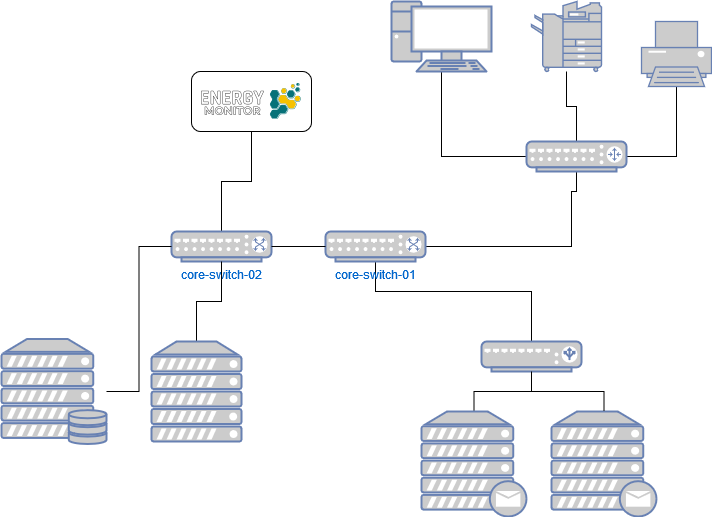
Host Checks and Alerts in Energy Monitor
Energy Monitor executes host checks based on a predefined check interval or on demand.
Alerts
Energy Monitor generates an alert whenever a service or host changes its state. This includes scenarios like an unreachable host coming back online or a service that was functioning correctly starting to show a warning. By default, the check interval is set to five minutes.
Monitoring States
When Energy Monitor detects a problem, it initially classifies it as a soft state. If the number of checks reaches the configured threshold (max_check_attempts), the problem is reclassified as hard, triggering a notification. Notifications are not sent for soft states.
On-demand Checks
Energy Monitor performs on-demand checks in specific situations, such as:
When a service associated with the host changes state.
As part of the host reachability logic.
For predictive host dependency checks.
On-demand checks are primarily executed when a service changes state to ensure that the host enters a hard critical state before its associated services during a full server outage. This helps avoid a notification storm by ensuring that Energy Monitor sends only one host notification instead of multiple service notifications.
Notifications
Users defined as contacts and linked to relevant services and hosts receive notifications based on the configuration in Energy Monitor. While all notifications are associated with alerts, not all alerts result in notifications. Energy Monitor can send notifications via email or SMS, and with additional configuration, it can also send notifications to other destinations such as databases and ticketing systems.
Monitoring agents in Energy Monitor
Energy Monitor conducts checks using agents that run scripts at regular intervals on hosts, reporting the results back to an Energy Monitor plugin. The results are displayed in a unified view, regardless of the agent, host, or service type.
Supported Agents
You can use the following agents with Energy Monitor:
SNMPv3 for Unix
NRPE for Unix
NSClient++ for Windows
SNMPv3
SNMPv3 provides secure authentication and encryption. The net-snmpd agent is available in the default package repository for most Unix operating systems. SNMPv3 also supports running existing NRPE plugins.
To use SNMPv3, configure SNMP daemons on the hosts.
NRPE
NRPE (Nagios Remote Plugin Executor) is a Unix client for executing plugins on remote hosts. Energy Monitor, through Naemon’s backward compatibility with Nagios plugins, works with NRPE.
NRPE is used with a set of local plugins. Any plugins on the Energy Monitor server can be utilized.
Although NRPE does not offer as much security as SNMPv3, you can enhance security using SSL.
NSClient++
NSClient++ integrates well with Windows Servers, embedding its commands into the registry and simplifying authentication. Energy Monitor communicates with NSClient++ using the check_nrpe plugin.
To monitor Windows servers with NSClient++, install NSClient++ on the hosts.
Agentless Monitoring
For agentless monitoring, you can use the following components:
WMI — for Windows servers.
check_by_ssh — for Linux servers.
SNMPv3 — for XEN and KVM servers, and SNMP-capable networking equipment.