Installation and System Requirements
System requirements
Supported Operating Systems
Red Hat Linux 8.X
Oracle Linux 8.X
Supported Web Browsers
Mozilla Firefox
Google Chrome
Microsoft Edge
Network Communication
From |
To |
Port |
Protocol |
Description |
Bidirectional Communication |
|---|---|---|---|---|---|
Energy Monitor |
Nrpe Agent |
5666 |
TCP |
Agent communication |
⬜ |
Energy Monitor |
Network Host |
161 |
UDP |
SNMP request comunication |
⬜ |
Network Host |
Energy Monitor |
162 |
UDP |
SNMP trap comunication |
⬜ |
User browser |
Energy Monitor |
443 |
TCP |
GUI |
⬜ |
Other node |
Energy Monitor |
15551 |
TCP |
Cluster communiaction |
✅ |
Other node |
Energy Monitor |
22 |
TCP |
SSH cluster comunication |
✅ |
Hardware Requirements
The following hardware requirements assume the default check intervals of 5 minutes.
If extensive logging is required in the environment, it is advisable to utilize 2 server, clustered environment.
Hosts |
CPU cores |
RAM |
Storage |
|---|---|---|---|
Up to 300 |
8 |
16 GB |
500 GB SSD |
Up to 1000 |
12 |
24 GB |
500 GB SSD |
Over 2000 |
12 |
32 GB |
1 TB SSD |
Partition Set Up (Up to 1000 hosts) |
|
|---|---|
/ |
10 GB |
/opt |
100 GB |
/tmp |
3 GB |
/home |
10 GB |
/data |
60 GB |
/var |
20 GB |
/var/lib |
120 GB |
/var/log |
35 GB |
/var/log/audit |
6 GB |
Partition Set Up (Over 2000 hosts) |
|
|---|---|
/ |
20 GB |
/opt |
100 GB |
/tmp |
3 GB |
/home |
10 GB |
/data |
60 GB |
/var |
20 GB |
/var/lib |
500 GB |
/var/log |
35 GB |
/var/log/audit |
6 GB |
Note: For installations above 2000 hosts we recommend involving EMCA engineers for the topology design.
Repository
Installation need access to below repo.
Red Hat 8 |
Oracle Linux 8 |
Added During Installation |
|---|---|---|
Red Hat Enterprise Linux 8 for x86_64 - AppStream |
Oracle Linux 8 Application Stream (x86_64) |
⬜ |
Red Hat Enterprise Linux 8 for x86_64 - BaseOS |
Oracle Linux 8 BaseOS Latest (x86_64) |
⬜ |
Red Hat CodeReady Linux Builder for RHEL 8 x86_64 |
Oracle Linux 8 CodeReady Builder (x86_64) |
✅ |
Extra Packages for Enterprise Linux 8 |
Extra Packages for Enterprise Linux 8 |
✅ |
Docker CE Stable |
Docker CE Stable |
✅ |
Installation
The Energy Monitor installer is delivered as tarball energy-monitor-{product_version}.tar.gz
The Energy Monitor comes with simple installation script called install.sh. It is designed to facilitate the installation and deployment process of our product. After running(execute) the script, it will detect supported distribution. The script is located in the energy-monitor directory.
Installation steps
Untar the archive containing installer
tar -xvf energy-monitor-{product_verison}.tar.gzGo to the extracted directory
cd ./energy-monitorRun installation script with installation flag
./install.sh -ior./install.sh install
If you are upgrading from a lower version, please use “-u” or “upgrade” parameter instead.

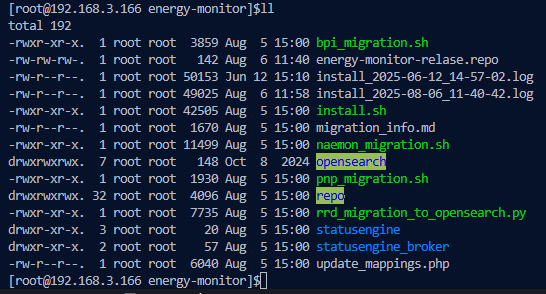
Follow the onscreen prompts. During this process you will be asked to confirm that you want to install Energy Monitor on your system.
If everything went correctly, you should be able to login to GUI with default credentials provided at the end of installation process.
By default, admin login is:
login: admin
password: admin
GUI will be available at https://IP_address of the machine it was installed on.
Note: Energy Monitor works only on https. Attempting to connect via http will result in error.
Copy license file to /etc/energy-monitor-license directory