Integrating Jira with Energy Monitor
Energy Monitor allows for sending for notifications from hosts and services to your Jira server.
In order to set it up the following must be done:
Setting up
in “/opt/naemon/etc/naemon/resource.cfg”, insert 3 macros:
$USER103$=example@example.com
$USER104$=https://test123aa.atlassian.net/rest/api/2/issue
$USER105$=ATATT3xTOKEN2vYDtU7SxEbUkJNUFgQKm242zbSAS0cGk8VUjYvXbjNjJhFXOdBRQN_KbBubQa2pfo4LcaTCfoi0zyV2wBNDf5odlPuqvzVQUTZCNwrFAOICof-tFIsHhF39GAC3JMJvZliVULqT7GDP_z1cZ-H9A9lIoZRWUGQiaw=TOKEN
Download an API security token from the following link:
https://id.atlassian.com/manage-profile/security/api-tokens
Note: Based on project's avalability parameter in Jira, the issues, can be of different types, ie. Epik /Task, which is the earliest function.
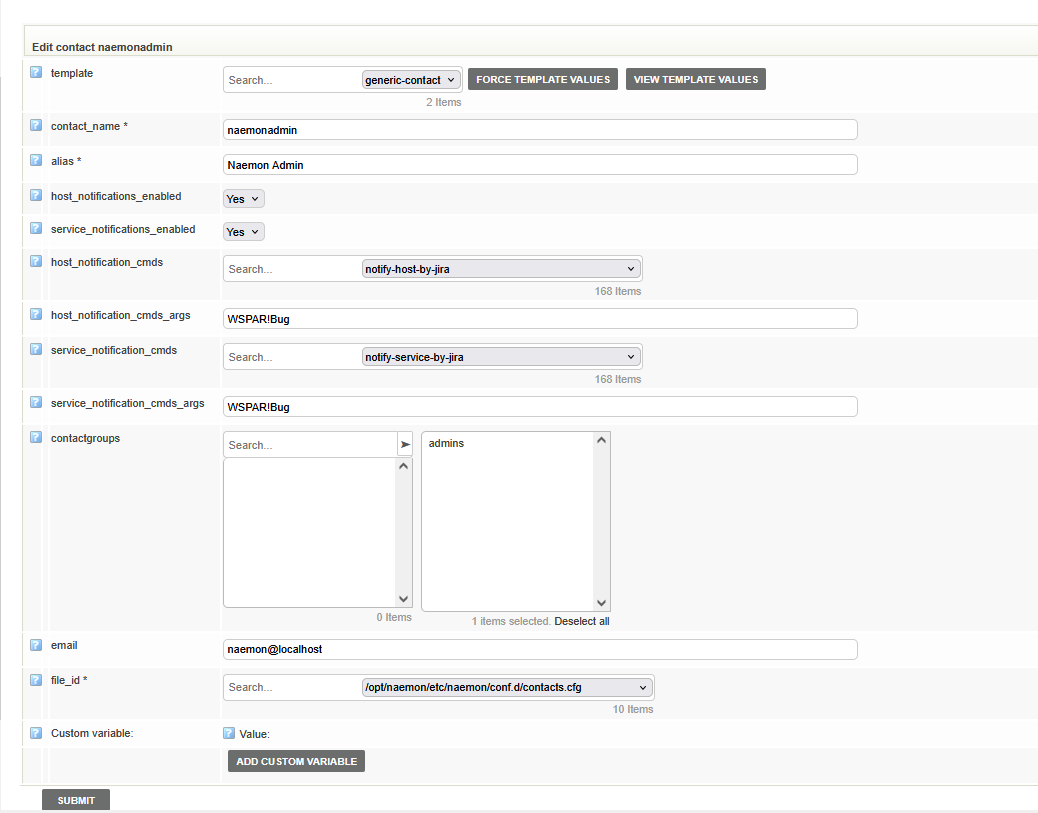
in “Manage” -> “Configure” -> “Contact”
Host notifications
Under “host_notification_cmds” field choose:
notify-host-by-jira
Under “host_notification_cmds_args” field choose:
$ProjectKey!$IssueType
for instance:
host_notification_cmds_args: `WSPAR!Bug
Note: Keep in mind that the Issue Type must be created and enabled in Your Jira project
Service notifications
Under “service_notification_cmds” field choose:
notify-service-by-jira
Under “service_notification_cmds_args” field choose:
$ProjectKey!$IssueType
for instance:
service_notification_cmds_args: `WSPAR!Bug