Naemon cluster configuration and environment scaling
Overview
Scaling a Naemon environment means distributing monitoring work across multiple Naemon instances instead of running every check on a single server. Energy Monitor uses Merlin to exchange monitoring data between Naemon processes and to support redundancy and load distribution.
The topology should be selected according to the required outcome:
Peer ↔ peer provides redundancy. Both nodes have equivalent roles, exchange monitoring state, and can share responsibility for the same configuration.
Master ↔ poller provides horizontal scaling. The master manages the monitoring configuration, while the poller executes checks for assigned host groups and returns the results.
Master + redundant master + poller combines high availability with workload distribution. Two peer nodes act as redundant masters, while a poller handles checks assigned to it.
Before starting, make sure that every node can resolve the other nodes by the hostnames used in the Merlin configuration and that SSH connectivity is available. Run the following command at any stage to inspect cluster status:
mon node status
Warning: The
asmonitor mon oconf push <node>command overwrites the existing object configuration on the destination node. Back up any local configuration that must be retained before running it.
Peer ↔ peer
Relationship description
Peer nodes are equal members of the cluster. They exchange monitoring events
and state information and provide redundancy for one another. A peer topology
is useful when monitoring must remain available after one node fails. The peers
must use a consistent object configuration; the procedure below copies the
configuration from peer01 to peer02.
The example uses these nodes:
Node |
IP address |
Role |
|---|---|---|
|
|
Peer |
|
|
Peer |
Note: The node names must resolve to their corresponding IP addresses. Add the entries shown below to
/etc/hostsonly when the names are not resolved by DNS. Alternatively, specify a literal IP address with the Merlinaddressparameter while retaining a descriptive logical node name.
Configure peer01
Add
peer02to/etc/hostsif required:192.0.2.12 peer02
Add
peer02to the Merlin node configuration:mon node add peer02 type=peer address=192.0.2.12
Push the SSH keys used by the administrative and
asmonitoraccounts:mon sshkey push --type=peer asmonitor mon sshkey push --type=peer
Restart the monitoring services:
mon restart
Configure peer02
Add
peer01to/etc/hostsif required:192.0.2.11 peer01
Add
peer01to the Merlin node configuration:mon node add peer01 type=peer address=192.0.2.11
Push the SSH keys used by the administrative and
asmonitoraccounts:mon sshkey push --type=peer asmonitor mon sshkey push --type=peer
Restart the monitoring services:
mon restart
Verify the status on both nodes:
mon node status


Synchronize the object configuration
To make both nodes operate on the same monitoring configuration, push the
configuration from one peer to the other. For example, run the following on
peer01 to replace the configuration on peer02:
asmonitor mon oconf push peer02
Restart all nodes after the configuration has been transferred:
mon node ctrl --self -- mon restart
Master ↔ poller
Relationship description
In a master-poller topology, the master is the central configuration and coordination node. A poller is responsible for executing checks for one or more assigned host groups and sending their results back to the master. This reduces the check-execution load on the master and makes it possible to monitor more hosts or remote network segments.
The example uses these nodes:
Node |
IP address |
Role |
|---|---|---|
|
|
Master |
|
|
Poller |
Note: The node names must resolve to their corresponding IP addresses. Add the entries shown below to
/etc/hostsonly when the names are not resolved by DNS. Alternatively, specify a literal IP address with the Merlinaddressparameter while retaining a descriptive logical node name.
Configure name resolution
On poller01, add the master:
192.0.2.11 master01
On master01, add the poller:
192.0.2.21 poller01
Configure the relationship
Run the following steps on master01 unless stated otherwise.
Confirm that the host group to be assigned to the poller exists:
mon query ls hostgroups -c members name="$HOSTGROUP_NAME"
Add the poller and assign the host group to it:
mon node add poller01 type=poller hostgroup="$HOSTGROUP_NAME" takeover=no address=192.0.2.21
Push the required SSH keys to the poller:
mon sshkey push poller01
asmonitor mon sshkey push poller01
Add
master01to the poller’s node configuration:mon node ctrl poller01 mon node add master01 type=master connect=no address=192.0.2.11
Restart Naemon on the master:
systemctl restart naemon
Push the object configuration to the poller:
asmonitor mon oconf push poller01
Restart the poller:
mon node ctrl poller01 mon restart
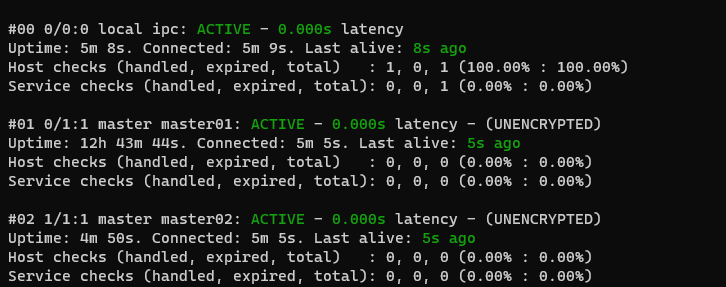
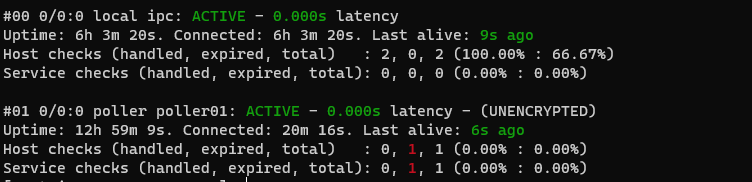
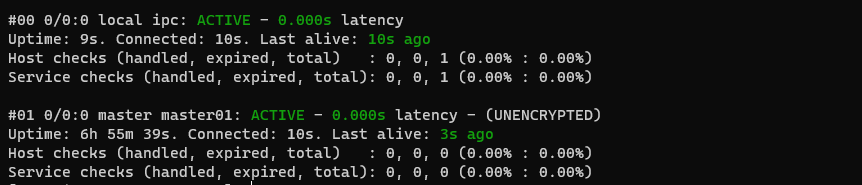
Verify the status on both instances:
mon node status
Master + redundant master + poller
Environment description
This topology combines the two preceding models. master01 and master02 form
a peer cluster and therefore provide redundant master functionality. Both masters
know about poller01, while the poller knows about both masters. The poller
executes checks for the assigned host group; the peer pair exchanges monitoring
state and keeps the central monitoring tier available if one master fails.
The example uses these nodes:
Node |
IP address |
Role |
|---|---|---|
|
|
Master and peer of |
|
|
Redundant master and peer of |
|
|
Poller |
Note: The node names must resolve to their corresponding IP addresses. Add the entries shown below to
/etc/hostsonly when the names are not resolved by DNS. Alternatively, specify a literal IP address with the Merlinaddressparameter while retaining a descriptive logical node name.
First, configure master01 and master02 as peers by following the procedure
in Peer ↔ peer, using the master hostnames shown above.
Configure name resolution
On master01, add:
192.0.2.12 master02
192.0.2.21 poller01
On master02, add:
192.0.2.11 master01
192.0.2.21 poller01
On poller01, add:
192.0.2.11 master01
192.0.2.12 master02
Connect master01 to the poller
Run the following commands on master01:
Confirm that the host group exists:
mon query ls hostgroups -c members name="$HOSTGROUP_NAME"
Add the poller and assign the host group to it:
mon node add poller01 type=poller hostgroup="$HOSTGROUP_NAME" takeover=no address=192.0.2.21
Push the SSH keys:
mon sshkey push poller01
asmonitor mon sshkey push poller01
Register
master01on the poller:mon node ctrl poller01 mon node add master01 type=master connect=no address=192.0.2.11
Restart Naemon on
master01:systemctl restart naemon
Push the object configuration to the poller:
asmonitor mon oconf push poller01
Restart the poller:
mon node ctrl poller01 mon restart
Connect master02 to the poller
Run the following commands on master02:
Confirm that the host group exists:
mon query ls hostgroups -c members name="$HOSTGROUP_NAME"
Add the poller and assign the host group to it:
mon node add poller01 type=poller hostgroup="$HOSTGROUP_NAME" takeover=no address=192.0.2.21
Push the SSH keys:
mon sshkey push poller01
asmonitor mon sshkey push poller01
Register
master02on the poller:mon node ctrl poller01 mon node add master02 type=master connect=no address=192.0.2.12
Restart Naemon on
master02:systemctl restart naemon
Push the object configuration to the poller:
asmonitor mon oconf push poller01
Restart the poller:
mon node ctrl poller01 mon restart
Complete the poller configuration
On poller01, push the SSH keys to both masters:
mon sshkey push --type=master
asmonitor mon sshkey push --type=master
Finally, run mon node status on all three nodes and confirm that both master
connections and the poller connection are active.
master01: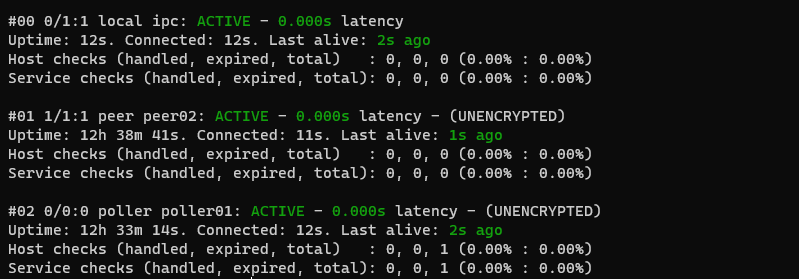
master02: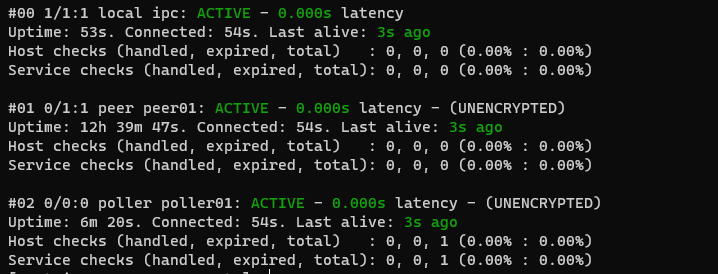
poller01: