Determining Status and Reachability of Network Hosts
The following page will explain how Energy Monitor determines status’s and reachability of the hosts.
Energy Monitor determines 2 statuses for hosts it cannot determine to be operating properly:
-   DOWN

    -   Down state means the host can be reached directly, but it isn't responding to checks.

    -   This state usually means the issue is with the endpoint itself.

    -   An example would be a down interface on the endpoint or a powered off web server

-   UNREACHABLE

    -   Unreachable state means the host cannot be reached at all.

    -   This state usually means that the problem is with a parent host, like a router or a switch. The parent connects Energy Monitor to the endpoint in question.
The following illustration assumes Energy Monitor monitors every endpoint, including servers, routers or switches.
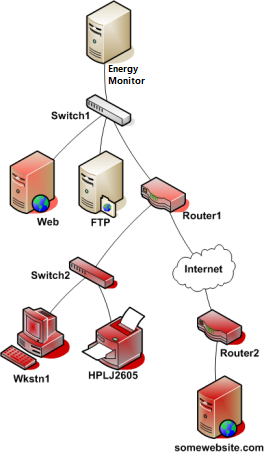
Take a look at the simple network diagram below. For this example, lets assume you’re monitoring all the hosts (server, routers, switches, etc) that are pictured. Nagios Core is installed and running on the Nagios Core host.
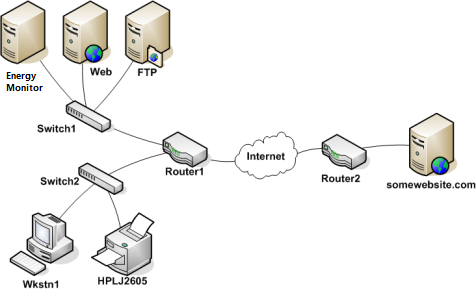
We will illustrate this concept within the following diagram.
We assume that the entire network is monitored, every endpoint, including servers, routers and switches.
Energy Monitor in order to determine which status to apply, DOWN or UNREACHABLE, must understand how the endpoints are connected with one another.
Starting from the Mainframe, a packet travels through switches and routers, each device forwards it further, until it reaches it’s target endpoint. Each such forward, is referred to as a “*hop”.
Therefore, for instance, if we send a packet from the Mainframe to FTP server, from the perspective of Switch 1, it’s “parent” is Energy Monitor. For Energy Monitor, Switch 1 is a “child”.
Following this hierarchical structure, from the point of Switch 2, Router 1 is a “parent”. And from Router’s 1 perspective, Switch 2 is a “child”.
Configuring the relations
This is how the structure looks like in host.cfg file or whatever file You use to keep the host definitions.
define host {
    host_name   Nagios   ; <-- The local host has no parent - it is the topmost host
}

define host {
    host_name   Switch1
    parents     Nagios
}

define host {
    host_name   Web
    parents     Switch1
}
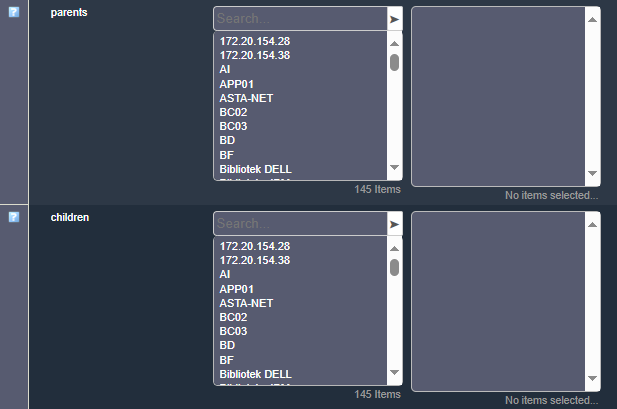
You can also set these up from GUI, from the following windows in the host configuration, available under “Advanced” tab:
Reachability Logic
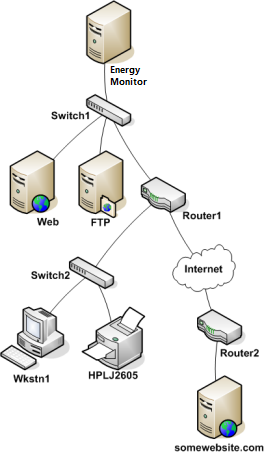
Let’s assume that Router 1 and Web Server experience malfunction and enter DOWN state.
What happens then? Energy Monitor launches a series of checks across the parents and by consequence: children. This mechanism allows the Mainframe to know exactly which host is DOWN.
In our example, the path to these 2 endpoints isn’t blocked. However the host itself isn’t responding to checks.
In this example, Nagios Core will determine that Web and Router1 are both in DOWN states because the “path” to those hosts is not being blocked.
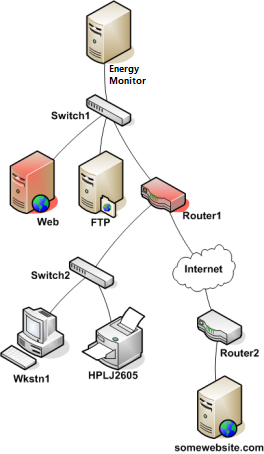
If Router 1 has issues, isn’t responding to checks, then the Mainframe has no idea what is happening to every other endpoint that is beyond it. Therefore, they all get UNREACHABLE state, while Router 1 gets the state of DOWN.
Administrator and other contacts will be notified of such an occurence, that states of DOWN and UNREACHABLE have been assigned to particular hosts.
The system can be modified to send only particular notifications but this is more explained in Notification Setup page.
Here, we will only mention that notifications can be configured either on the level on a host or the contact itself. For convenience, to not have to receive both DOWN and UNREACHABLE, it’s simpler to edit the contact, to set which notifications you want to receive.